Reblog: Can muscle fibers grow without being activated?

Chris Beardsley·Follow5 min read·2 hours ago–ListenShareAfter publishing my last short article, I received some feedback from friends and colleagues notifying me that one of the reasons that many people are struggling with the use of the principle of neuromechanical matching for governing exercis

from Pocket
via Did you enjoy this article? Then read the full version from the author’s website.

Reblog: What Startups Are Really Like

Paul Graham’s essay on what startups are really like:

I wasn’t sure what to talk about at Startup School, so I decided to ask the founders of the startups we’d funded. What hadn’t I written about yet? I’m in the unusual position of being able to test the essays I write about startups.

from Pocket
via Did you enjoy this article? Then read the full version from the author’s website.

Reblog: To Understand Heart Disease, You Need To Understand This.

Heart disease does not kill people. Heart attacks do.

Appreciating this distinction is critical to understanding heart disease.

Heart disease is the presence of plaque or atherosclerosis in the coronary arteries.

(Heart disease can, of course, refer to many other heart-related conditions, but in general, the terms heart disease and coronary artery disease or atherosclerosis are typically used interchangeably)

A heart attack occurs when plaque ruptures in the artery, forming a clot that blocks blood flow down the artery, and the heart muscle dies.

from Pocket
via Did you enjoy this article? Then read the full version from the author’s website.

Reblog: Thoughts on SwiftUI from WWDC 19

SwiftUI

So what’s the big deal with SwiftUI? Well here’s why I think it’s great.

  1. One UI framework for all platforms It has always baffled me why Apple never made UIKit work on the Mac. If it worked for iOS and tvOS it could certainly also work on the Mac (which it does now thanks to Project Catalyst). For me, this means having double the work on many parts of the UI on Secrets for Mac and iOS. Now and then, you would see rumors that would give you hope. “Maybe next year” you’d think… but the years passed and nothing. Looking back, I can’t help but wonder if this was Apple’s plan all along. SwiftUI is certainly a multi-year effort. The underpinnings of the combined framework are at least 5 years old:

    Joe Groff@jckarter

    Combine goes back before even Swift existed. I’ve been helping the SwiftUI folks for at least three years, and they were probably working on stuff before I knew about it

    David Smith@Catfish_Man

    I was curious what the earliest Combine-related file I have on my computer is, and it turns out it’s August 14th 2013. I filed the radar it references on 10/23/2012.

    Also apparently yet another short-lived project name I forgot about?? pic.twitter.com/FR6NADWrs5

    View image on Twitter

    And although I haven’t played much with it yet certainly there’ll be a lot of bugs/shortcomings to iron out for next few years.

  2. Declarative To put it succinctly, this means that instead of telling the framework what to do you tell it what you want. The framework then figures out how to achieve. And you’ve seen this style of coding already with Auto Layout. It offloads much of the complexity to the framework.By introducing this abstraction and letting the framework do the job of composing the UI for you we get:
    • Automatic support for many of the system features: dynamic type, accessibility, dark mode, etc;
    • Adaptive layouts on different platforms (a switch on the iPhone becomes a checkbox on the Mac);
    • Freedom from having to adapt our UI whenever Apple needs to evolve it (what SwiftUI uses to satisfy a Text element may change on the next release).

    I had a professor that used to say:

    All problems in CS can be solved with one more level of indirection.

    It still holds.

  3. Reactive I’ve never invested much time with any of the reactive frameworks out there. I definitely appreciated the principles behind them but I’ve always been very critical of frameworks1 or technologies2 that are too invasive.With what I’ve already seen on the sessions and demos, I’m just about ready to forgive Apple for abandoning development of the controversial Cocoa Bindings3.

    We write so much glue code that I’ve got no problems accepting the learning curve of all the new stuff that is driving this both in the Swift language and the new Combine framework.

I’m cautiously excited about SwiftUI and sincerely hope it will live up to expectations.
Did you enjoy this article? Then read the full version from the author’s website.

Reblog: Suffering-oriented programming

Suffering-oriented programming can be summarized like so: don’t build technology unless you feel the pain of not having it. It applies to the big, architectural decisions as well as the smaller everyday programming decisions. Suffering-oriented programming greatly reduces risk by ensuring that you’re always working on something important, and it ensures that you are well-versed in a problem space before attempting a large investment.

[Nathan Marz has] a mantra for suffering-oriented programming: “First make it possible. Then make it beautiful. Then make it fast.”

via Did you enjoy this article? Then read the full version from the author’s website.

Acceleration and Motion Sickness in the Context of Virtual Reality (VR)

As I traveled around the world with the HTC Vive and Oculus Rift, universally first-timers would be fascinated, but a bit woozy after trying VR. What contributes to this? One possibility is the vergence-accommodation issue with current displays. However, the subject of this post is locomotion and the anatomical reasoning behind the discomfort arising from poorly designed VR.

With VR you typically occupy a larger virtual space than that of your immediate physical surroundings.

So, to help you traverse, locomotion or in other words a way of sending you from point A to point B in the virtual space was designed. Here’s what this looks like:

Image result for teleportation vr gif

Caption: This guy is switching his virtual location by pointing a laser on the tip of his controller to move around.

Movement with changing velocity through a virtual environment can contribute to this overall feeling of being in a daze.

That’s why most creators smooth transitions and avoid this kind of motion (i.e. blink teleport, constant velocity movement from Land’s End). Notice how the movement seems steady and controlled below?

Image result for lands end vr gif

Acceleration and Velocity

‘Acceleration’ is, put simply, any kind of change of speed measured over time, generally [written] as m^-2 (meters per second, per second) if it’s linear or in rad^-2 (same but with an angle) if it’s around an axis. Any type of continuous change in the speed of an object will induce a non-zero acceleration.”

The Human Vestibular System

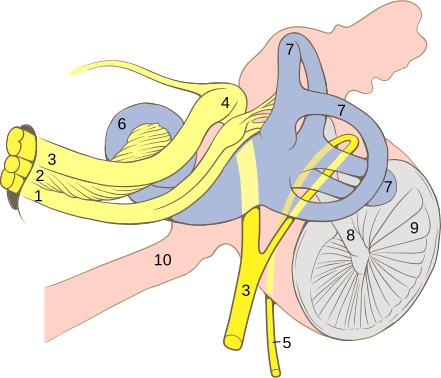
When you change speed, your vestibular system should register an acceleration. The vestibular system is part of your inner ear. It’s basically the thing that tells your brain if your head is up or down, and permit[s] you to [stand] and walk without falling all the time!

Internal ear diagram that show the semi-circular cannals where the acceleartion forces are sensed.

Fluid moving in your semicircular canals is measured and the information is communicated to your brain by the cranial nerves. You can think of this as [similar to how] an accelerometer and a gyroscope works.

[This] acceleration not only includes linear acceleration (from translation in 3D space), but also rotational acceleration, which induces angular acceleration, and empirically, it seems to be the worse kind in the matter of VR sickness…”

Now that you have this grounding for our anatomical system of perceiving acceleration the upshot is that often viewers in VR will experience movement visually but not via these semicircular canals. It’s this incongruence that drives VR sickness with current systems.

Some keywords to explore more if you’re interested in the papers available are: Vection, Galvanic Vestibular Stimulation (GVS), and Self-motion.

via Read more on the ways developers reduce discomfort from the author’s website.

Reblog: 3 ways to draw 3D lines in Unity3D

Just as I was thinking about an interesting demo to play with drawing functions in Unity3D, Mrdoob published his Harmony drawing tool made with HTML5/Canvas. It looks really cool, so I though how about doing this in 3D? I only had to figure out how to draw lines.

I did some research and below I present 3 different solutions. You can grab the source of the examples discussed below here.

Drawing lines with Line Renderer [demo]

When it comes to lines, the first thing you’ll bump into in the Unity3D API is the Line Renderercomponent. As the name suggests, it is used to draw lines so it seems the right tool for the job. Lines in this case are defined by 2 or more points (segments), a material and a width.

It has an important limitation: the line must be continuous. So if you need two lines, you need two renderers. The other problem is that the Line Renderer acts very strangely when new points are added dynamically. The width of the line does not seem to render correctly. It’s either buggy or just wasn’t designed for such use. Because of these limitations I had to create a separate Line Renderer for each tiny bit of line I’m drawing.

It was easy to implement, but not very fast since I end up spawning lots of GameObjects each with a LineRenderer attached. It seems to be the only option if you don’t have Unity3D Prothough.

Drawing lines as a mesh using Graphics [demo]

The Graphics class allows to draw a mesh directly without the overhead of creating game objects and components to hold it. It runs much faster than Line Renderer, but you need to create the lines yourself. This is a bit more difficult but also gives you total control of the lines – their color, material, width and orientation.

Since meshes are composed of surfaces rather than lines or points, in 3D space a line is best rendered as a very thin quad. A quad is described with 4 vertices, and usually you’ll only have the start and end points and a width. Based on this data you can compute a line like this:

Vector3 normal = Vector3.Cross(start, end);
Vector3 side = Vector3.Cross(normal, end-start);
side.Normalize();
Vector3 a = start + side * (lineWidth / 2);
Vector3 b = start + side * (lineWidth / -2);
Vector3 c = end + side * (lineWidth / 2);
Vector3 d = end + side * (lineWidth / -2);

First, you get the normal of the plane on which both start and end vectors lie. This will be the plane on which the line-quad will located. The cross product of the normal and of the difference between end and start vectors gives you the side vector (the “thin” side of the quad). You need to normalize it to make it a unit vector. Finally calculate all 4 points of the rectangle by adding the side vector multiplied by half width to both start and end points in both directions. In the source code all this happens in MakeQuad and AddLine methods, so take a look in there.

It wasn’t easy to implement, but once I was there it runs pretty fast.

Direct drawing with GL [demo]

No fast is fast enough! Instead of leaving this topic and live happily with the Graphics solution, I kept searching for something even better. And I found the GL class. GL is used to “issue rendering commands similar to OpenGL’s immediate mode”. This sounds like fast, doesn’t it? It is!

Being much easier to implement that the Graphics solution it is a clear winner for me, the only drawback being that you don’t have much control over the appearance of the lines. You can’t set a width and perspective does not apply (i.e. lines that are far behind look exactly the same as those that are close to the camera).

Conclusion

For massive & dynamic line drawing LineRenderer is not the best solution, but it is the only one available in Unity free version. It can surely be useful to draw limited amounts of static lines and this is probably what it was made for. If you do have Unity3D Pro, the solution with Graphics is reasonable and very flexible but if it is performance you’re after choose GL.

via Did you enjoy this article? Then read the full version from the author’s website.

Reblog: Player – Game – Designer

The above work comes from Thomas Bedenk, who I met at VRX London in 2016. See end his page for sources (link found at bottom).

This model provides a substrate, an interactive application namely a game and its production and consumption, and highlights the aspects regarding components Player, Game, and Designer into the full picture.

Read the full version from the author’s website.