Reblog: Pay attention: Practice can make your brain better at focusing

Practicing paying attention can boost performance on a new task, and change the way the brain processes information, a new study says.


In my first blog post on the Oculus forums, I write:

“Boiling things down, I realized a few tenets of virtual reality to highlight 1) is that one is cut off from the real world if settings are in accordance (i.e. no mobile phone notifications) and therefore undivided attention is made. 2) Immersion and presence can help us condense fact from the vapor of nuance. The nuance being all of the visual information you will automatically gather from looking around that you would otherwise not necessarily have with i.e. a textbook.”

What would you leverage VR’s innate ability to funnel our attention and focus for?

from Pocket

via Did you enjoy this article? Then read the full version from the author’s website.

Project Futures: The Future of Farming

The following is the 1 – 5 paragraph proposal I submitted to Oculus Launchpad 2017. In terms of why you should care about this, I am open to suggestions on what installments to make next.

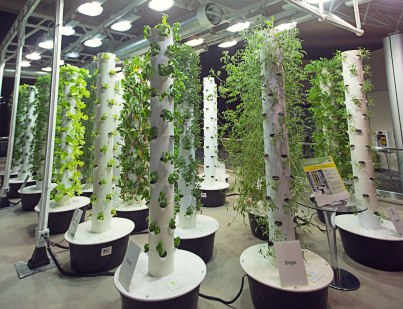
Project Futures is a virtual reality series that aims to put people right in the middle of a realized product vision. I’ll set out to make a couple example experiences to share from rolling out over the next couple of months. The first will be about the future of farming. Vertical, climate controlled orchards that are shippable to anywhere in the world. 

“His product proposes hydrant irrigation feed vertical stacks of edible crops—arugula, shiso, basil, and chard, among others—the equivalent of two acres of cultivated land inside a climate-controlled 320-square-foot shell. This is essentially an orchard accessible by families in metropolitan settings. People will need help a) envisioning how this fits into the American day b) how to actually use an orchard/garden like this”

Industrial Landscape

Since VR is such an infant technology, if you can communicate your idea introduce your product, using a more traditional method (e.g. through illustration, powerpoint, or video as below) then you probably should.

vertical_farm_2

There are, however, some ideas that are very bad to communicate using traditional methods. That’s why it’s an appealing idea to use VR to introduce product ideas today. Climate controlled vertical farms that are shippable are extremely difficult to conceptualize for the average American. There is real value for the customer; who gets a learning experience fueled by virtual interactions and immersive technology about what it’s like to use one such orchard for grocery shopping. 

Now here’s where my story starts to converge with this idea for the series. I keenly seek out constraints that will allow me to keep healthy and eat healthily. Incredibly, I’m using a service which allows local bay area farms to deliver groceries for the week to my door every Tuesday.  I only order paleo, or rather plant based pairings with a protein, ingredients.

What I want to focus on, is that currently, this service isn’t ready to scale across the nation. I guess, there simply aren’t resources for the same crops in different places among other logistical reasons for not scaling far beyond the bay area. So I thought…. this delivery infrastructure obviously sits atop resources created by farmers. So, to scale this delivery which can be so good for the consumer’s health, well, the infrastructure promise of a shippable orchard can be huge. Conditional on the climate controlled, shippable orchard’s effectiveness, all geographic areas would be addressable markets for such a delivery service.

I would like to empower people across the world to have access to healthy foods. But an important point in this process is a shift in thinking about how this healthy future might exist. VR is a device that I’ve paid close attention to for a couple of years and before I get too far ahead of myself, I will see what I can produce with it to communicate on the idea of the climate controlled shippable orchard. An example of the interaction a user would have is depicted here.

411HRB1dUHL_jpg__500×360_.png


As a user puts the tracked controller into the collider of the plant she can spatially pick one of the options (“pluck”, “about”, “farm”).

‘Pluck’ will do exactly what you’d expect, spawning perhaps a grocery bag for the user to place that bit of shiso (or kale) in. ‘About’ would detail more about the crop (i.e. origins and health benefits). ‘Farm’ would articulate the local of optimal growth and known farmers of such a crop.

If you have an idea that you think would slot well into the Project Futures virtual reality series about the future of different products. Ping me at dilan [dot] shah [at] gmail [dot] com as I would love to talk to you about it.

OLP Day 2: Chris Pruett Unity Session

The following are my notes from a day at Oculus Launch Pad 2017 with Director of Mobile Engineering @ Oculus, Chris Pruett.

Chris Talking about Unity Workflow and Areas of OLP Interest

Unity Scene Setting: Grungy mid-80s arcade space with a main room and games room. Built for Rift, Vive, etc. details differ at a SDK level. It’s unreleased and he is focused on Mobile VR, and hence it’s designed to be efficient for mobile target devices.

Loading Scene and other tricks and tips for optimizing load-in

The base is that it takes a really long time to load things. The purpose of this is basically to contain the OVR SDK utilities and also has a higher frame rate. If you have been in a heavy load scene and move your head around you get really bad frame drops. One other thing you can do on the topic of scene load (takes a really long time to load a couple hundred megabits of data on a phone), put the assets in an asset bundle. Unity 5 also loves to check the preload audio data check box in “import settings” for any audio file. To take pressure off of the game engine uncheck this “Preload Audio Data” box; it’s possible to shift audio “load type” to “Compressed to Memory”.
Before the level load
  • Put scenes assets in an asset bundle, use the OVROverlay script, synchronously load, when complete turn the cube map off
  • You could decide that a one-time level load is better than a multiple level load. As long as your session time is fairly long you paid all the costs at one time, and now you have a memory buffer for the experience.
————————————————————————————————————–

What’s notable inside OVR Utilities

You have a package called Oculus Utilities for Unity 5 this notably contains:
  • High-level VR Camera Headset (e.g. LeftEyeAnchor, RightEyeAnchor, CenterEyeAnchor)
  • Controllers API for higher-end hand-controllers (Touch) and lower-end hand-controller (gear)
  • User gets to choose left/right setting for the Gear controller
  • OVRInput.cs is abstracted in a way that allows for input from any controller (i.e. LTrackedController or RTrackedController)

OVROverlay

  • Built into the Oculus SDK – it’s a texture that is rendered not by the game engine but by timewarp –– which is something similar to asynchronous reprojection
  • Your engine renders a left and right eye buffer and submits it to the Oculus SDK
  • The basic things that it does are projects images, warping the edge of images in the right way for the specific hardware in use
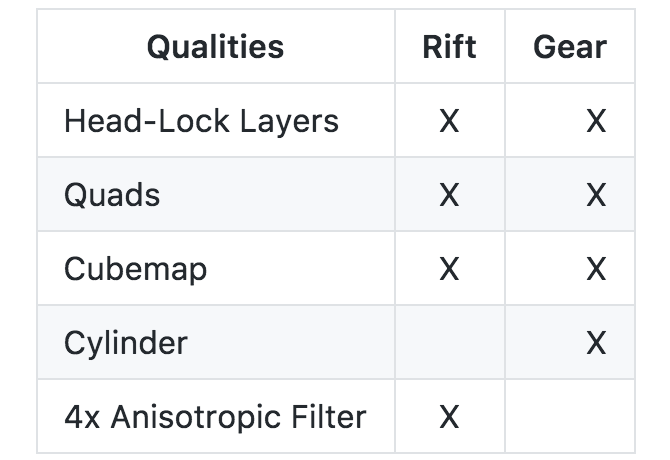
  • Timewarp – Tries to alleviate judder. It takes a previous frame and reshows this in practice, it only knows about orientation information and it’s not going to help with the camera moving forward. It will render some overlays for you. First of all timewarp has an opportunity to render faster than Unity. Timewarp composites in the layers that you submit which are essentially “Quads”. This is particularly good if you’re rendering video. It was made initially for mobile, but there’s now an additional buffer for Rift that you have to Upshot: You can get a higher fidelity by pushing certain texture through Timewarp.

VR Compositor layer

Does some texture mapping
Screen Shot 2017-06-11 at 2.25.31 PM.png

OVRInput.cs

This section could use some filling out

  • Check the public enum Button for more interesting maps
  • Check out public enum Controller for both Oculus Touch and Gear VR Controller orientation info e.g. LTrackedRemote or RTrackedRemote –– will give you back a quaternion

Potentially To Come: OculusDebugTool, right now it’s only on the Rift


Fill Cost

  • Today eye buffers aren’t rendering the same resolution as the device, but rather 1024 x 1024, which is a 3rd of the resolution of GearVR displays
  • No one comes  fill bound but the buffers are 1400 x 1400
  • The way that Chris thinks about this is the total number of pixels that will get touched for a computation, and the number of times it will compute/touched

Draw Calls

The goal is the get the fewest number of these: check playersettings>options “Static Batching” and “Dynamic Batching” leave them checked. Rendering path is always “forward”
  • Draw calls are organized around a mesh
  • Batches are “when you take like five meshes of the same material and collect them up and issue draw calls in succession (this is because the real-time cost comes with loading in info about the draw)” in Stats this is the total number of draw calls (want to keep under 150), “Saved by Batching” refers to
  • Static Batched objects are objects that you mark as “Static” in the details pane on the right side. Saying that this object isn’t going to move or scale.

Movie Textures

this section needs filling out… not sure what specific advice was doled out

Optimization: Dynamic Versions of Interactive Objects

Colliders get expensive when you start to move them. How do you achieve an optimized version of your app/game with Interactive objects but only pay for them on interact events?
If you want an ‘interactable’ you don’t want the object to be static, but for performance reasons if I know that the object will likely not be moved, for example a pool table (have two pool tables one static and one dynamic) the moment that someone tries to flip this table switch in the dynamic one.
Let’s put this setup on steroids, now we have 2000 objects just like this pool table. Should we still do this swap? You don’t pay for inactive objects (i.e. the dynamic ones that aren’t enabled in the scene) so yes you would be able to use this technique of swapping in dynamic versions/instances of your objects. Let’s pause to consider a slightly different angle on this problem…
Let’s say you just want your 2000 objects to reflect color changes due to environment changes; you can keep your static batching but change the shaders to accommodate this (see lightning example below in “Lightmap and Lightmap Index” section). Another way to accommodate is instance the material, set the material back to the starting material once changes are done.

Frame Debug

Use this to walk through all your draw calls. Can be very helpful to understand how Unity draws your scene. Opaque geometry comes first, followed by more transparent objects.

Expand on how one can open this up in the Unity Editor, please.

Lightmap and Lightmap Index

  • Window>Lighting>Setting you can basically bake your lighting here in “Lightmap Settings”
  • Please fill out this section more if you have other notes
  • If you wanted to have a crack of lightning or something, the way to do that is write your own shader that will light all surfaces for objects by increasing the saturation of every object etc.
  • In the past, Chris has found it edifying to delve into the code for the Unity Shaders such as Mobile Diffuse or Standard, which are all available publicly
Let’s say we want all of the assets in the scene to reflect an ominous mood; you can go into Lighting>Settings:
Unity_5_6_1f1_Personal__64bit__-_StartingScene_unity_-_VikingQuestVR_551_-_Lighting.png

You can barely see but on the far right highlighted in the yellow box, you have a setting for source that is set to “Skybox”

and set “Source” to skybox and apply an ominous skybox there by dragging it from the Project window to the box next to the word “Source”.


Oculus SDK for Multiplayer

  • Rooms: once players are in the room they can share info
  • Hard-code a roomID – helps with info transfer across multiple instances of Unity running (i.e.two different gearVRs running with the same app open can share info)
Side Notes
  • Specular – computes the same simple (Lambertian) lighting as Diffuse, plus a viewer dependent specular highlight.
  • Draw calls are organized around a mesh
  • In some cases, Unity will take images that match the same material and batch them (two versions: static mesh batching and dynamic batching) it works based on material pointers.
  • At playtime/buildtime Unity will load a bunch of stuff into the same static combined mesh
  • Colliders get expensive when you start to move them
  • Progressive Lightmapper
  • Combined meshes can be viewed which is cool
  • Unity isn’t going to batch a texture, that’s why he/a very talented artist made the atlas. You can try using Unity’s API for atlas creation or MeshBaker for similar effects.
  • Set Pass Call – is a pass within a shader (some shaders require multiple passes)
  • Unity 5.6 – Single-pass stereo rendering –– halves your draw call # and in practice its about 1/3 of all of this
  • If you want to use Oculus Touch to do pointing or thumbs up (i.e. Facebook Spaces) there is a function found in one of the scripts called GetNearTouch() which allows you to check sensors on Touch Controllers and toggle a hand model point/thumbs up on and off
  • Mipmaps – further reading
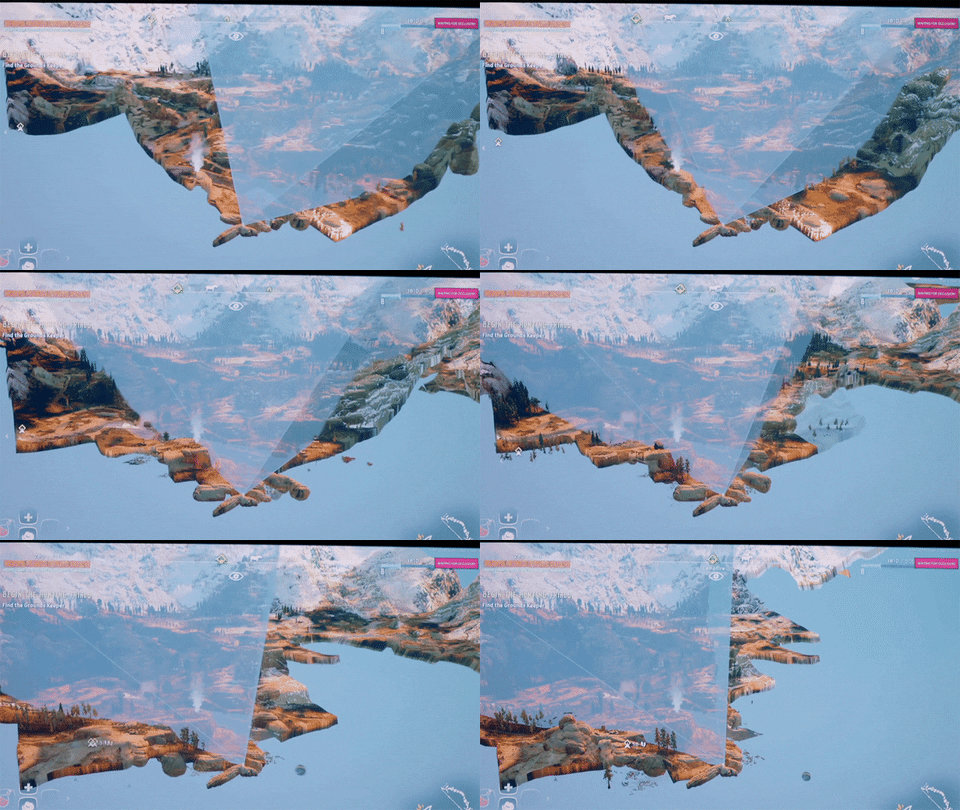
  • Occlusion Culling – What you’re able to see or not see at any given second (i.e. Horizon Zero Dawn below) – Window>Occlusion Culling
giphy

click here for the gif source

Reblog: Doob 3D-High Fidelity Partnership Promo: First 100 Scans Free

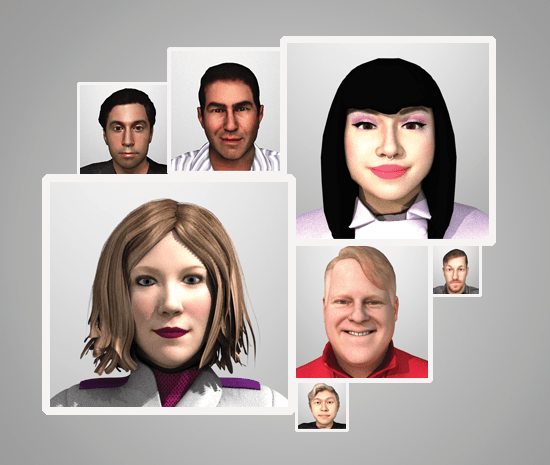
Today, High Fidelity and doob™ announce a partnership to enable the importing of doob™ full body scans into High Fidelity virtual reality environments as fully-rigged user avatars.

I myself have made an appointment and will post later on how my model comes out by uploading it to Sketchfab with a high likelihood.

from Pocket

via Did you enjoy this article? Then read the full version from the author’s website.

Reblog: Refining Images using Convolutional Neural Networks (CNN) as Proxies by Jasmine L. Collins

For my Machine Learning class project, I decided to look at whether or not we can refine images by using techniques for visualizing what a Convolutional Neural Network (CNN) trained on an image recognition task has learned.

from Pocket

via Did you enjoy this article? Then read the full version from the author’s website.

Reblog: Football: A deep dive into the tech and data behind the best players in the world

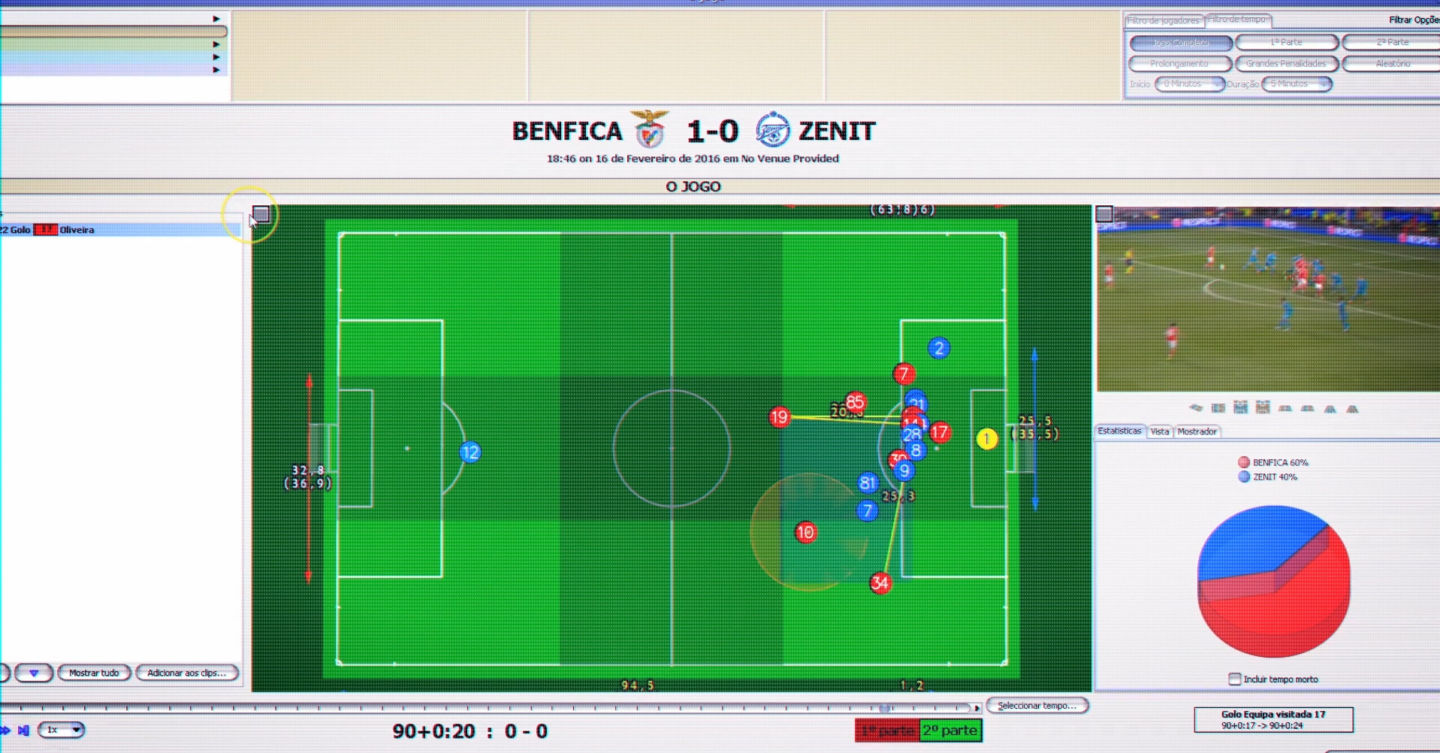
S.L. Benfica—Portugal’s top football team and one of the best teams in the world—makes as much money from carefully nurturing, training, and selling players as actually playing football.

Football teams have always sold and traded players, of course, but Sport Lisboa e Benfica has turned it into an art form: buying young talent; using advanced technology, data science, and training to improve their health and performance; and then selling them for tens of millions of pounds—sometimes as much as 10 or 20 times the original fee.

Let me give you a few examples. Benfica signed 17-year-old Jan Oblak in 2010 for €1.7 million; in 2014, as he blossomed into one of the best goalies in the world, Atlético Madrid picked him up for a cool €16 million. In 2007 David Luiz joined Benfica for €1.5 million; just four years later, Luiz was traded to Chelsea for €25 million and player Nemanja Matic. Then, three years after that, Matic returned to Chelsea for another €25 million. All told, S.L. Benfica raised more than £270 million (€320m) from player transfers over the last six years.

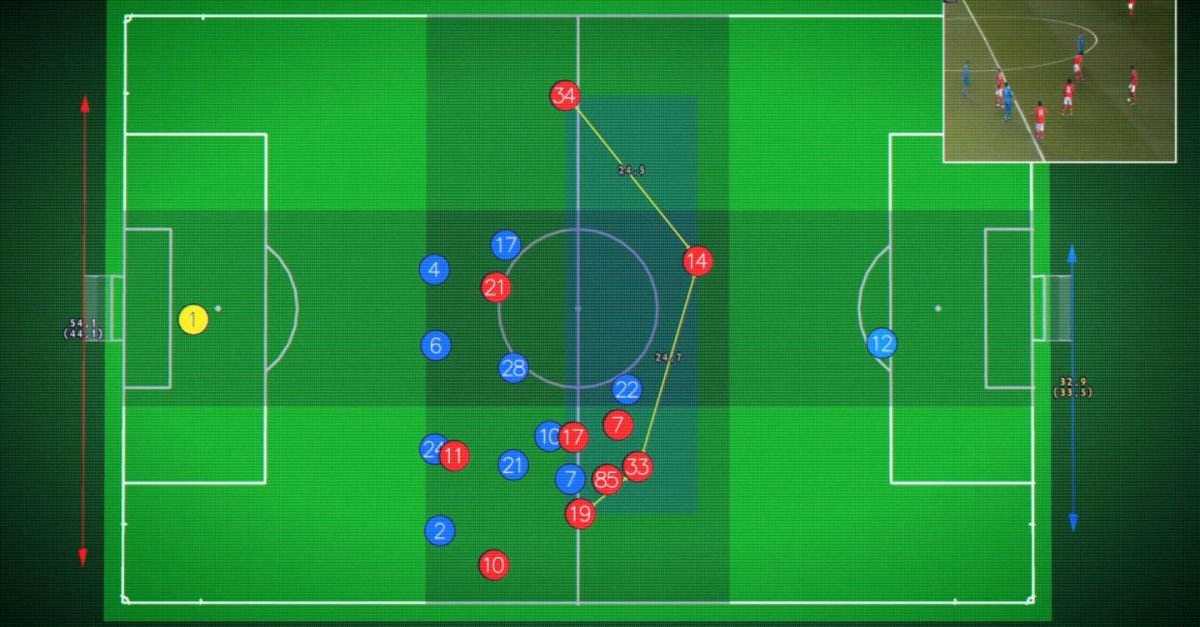
At Benfica’s Caixa Futebol Campus there are seven grass pitches, two artificial fields, an indoor test lab, and accommodation for 65 youth team members. With three top-level football teams (SL Benfica, SL Benfica B, and SL Benfica Juniors) and other youth levels below that, there are over 100 players actively training at the campus—and almost every aspect of their lives is tracked, analyzed, and improved by technology. How much they eat and sleep, how fast they run, tire, and recover, their mental health—everything is ingested into a giant data lake.

With machine learning and predictive analytics running on Microsoft Azure, combined with Benfica’s expert data scientists and the learned experience of the trainers, each player receives a personalized training regime where weaknesses are ironed out, strengths enhanced, and the chance of injury significantly reduced.

Sensors, lots of sensors

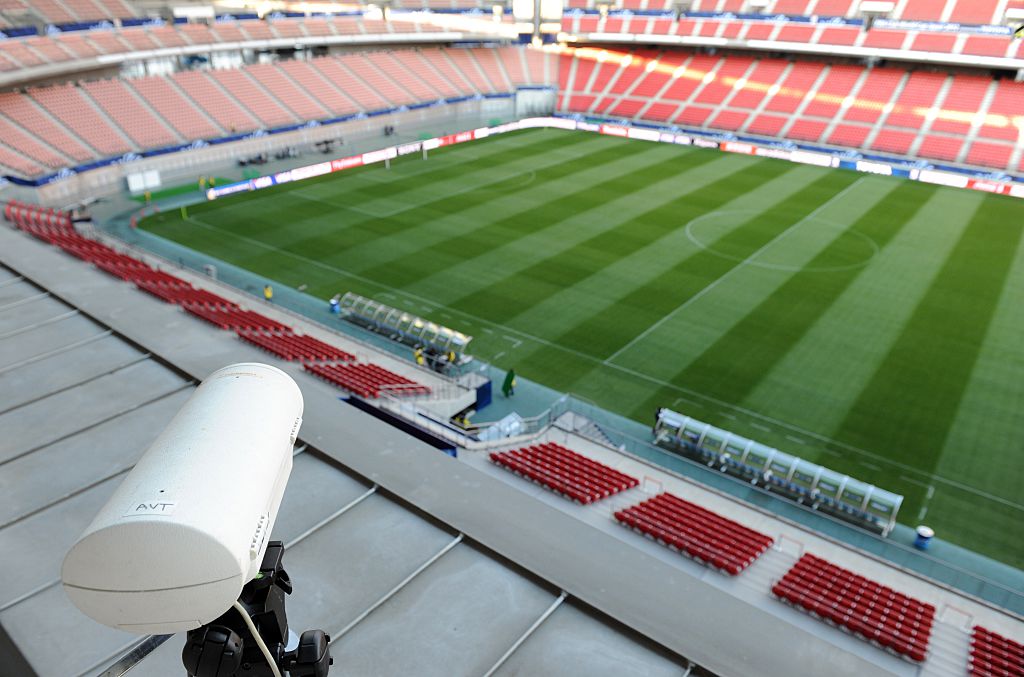
Before any kind of analysis can occur, Benfica has to gather lots and lots of data—mostly from sensors, but some data points (psychology, diet) have to be surveyed manually. Because small, low-power sensors are a relatively new area with lots of competition, there’s very little standardization to speak of: every sensor (or sensor system) uses its own wireless protocol or file format. “Hundreds of thousands” of data points are collected from a single match or training session.

Processing all of that data wouldn’t be so bad if there were just three or four different sensors, but we counted almost a dozen disparate systems—Datatrax for match day tracking, Prozone, Philips Actiware biosensors, StatSports GPS tracking, OptoGait gait analysis, Biodex physiotherapy machines, the list goes on—and each one outputs data in a different format, or has to be connected to its own proprietary base station.

Benfica uses a custom middleware layer that sanitises the output from each sensor into a single format (yes, XKCD 927 is in full force here). The sanitised data is then ingested into a giant SQL data lake hosted on the team’s own data centre. There might even be

Joao Copeto, chief information officer of S.L. Benfica.

a few Excel spreadsheets along the way, Benfica’s chief information officer Joao Copeto tells Ars—”they exist in every club,” he says with a laugh—but they are in the process of moving everything to the cloud with Dynamics 365 and Microsoft Azure.

Once everything is floating around in the data lake, maintaining the security and privacy of that data is very important. “Access to the data is segregated, to protect confidentiality,” says Copeto. “Detailed information is only available to a very restricted group of professionals.” Benfica’s data scientists, which are mostly interested in patterns in the data, only have access to anonymised player data—they can see the player’s position, but not much else.

Players have full access to their own data, which they can compare to team or position averages, to see how they’re doing in the grand scheme of things. Benfica is very careful to comply with existing EU data protection laws and is ready to embrace the even-more-stringent General Data Protection Regulation (GPDR) when it comes into force in 2018.

via Did you enjoy this article? Then read the full version from the author’s website.

Reblog: Why Voxels Are the Future of Video Games, VR, and Simulating Reality

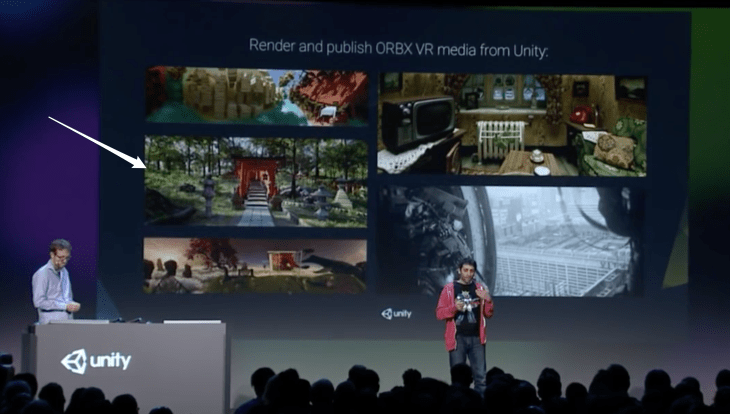
At VRLA this past month, I had the opportunity to see first-hand how the technology gap is closing in terms of photorealistic rendering in virtual reality. Using the ODG R-9 Smartglasses, Otoy was showing a CG scene rendered using Octane Renderer that was so realistic I couldn’t tell whether or not it was real. The ORBX VR media file that results when you build a scene using Octane can be played back at 18K on the GearVR. Unity and Otoy are actively working to integrate their rendering pipeline in the Unity2017 release of the engine. And in short, with a light-field render option, you can move your head around if the device’s positional tracking allows for it.

Screen_Shot_2017-05-08_at_4_08_29_PM.png

Octane is an unbiased renderer. In computer graphics, unbiased rendering is a method of rendering that does not introduce systematic errors or distortions in the estimation of illumination. Octane became a pipeline mainly used for visualization work, everything from a tree to a building for architects, in the early 2010s. About 13 years ago, Sony Pictures Imageworks enabled VFX knowledge that is coming to VR content from Magnopus. How VR, AR, & MR Are Driving True Pipeline Convergence, Presented by Foundry

change of pace with the voxel, so named as a shortened form of “volume element”, is kind of like an atom. It represents a value on a regular grid in three-dimensional space.

This is analogous to a texel, which represents 2D image data in a bitmap (which is sometimes referred to as a pixmap). As with pixels in a bitmap, voxels themselves do not typically have their position (their coordinates) explicitly encoded along with their values. Instead, the position of a voxel is inferred based upon its position relative to other voxels (i.e., its position in the data structure that makes up a single volumetric image). In contrast to pixels and voxels, points and polygons are often explicitly represented by the coordinates of their vertices. A direct consequence of this difference is that polygons are able to efficiently represent simple 3D structures with lots of empty or homogeneously filled space, while voxels are good at representing regularly sampled spaces that are non-homogeneously filled. [1]

Within the last year, I’ve seen Google’s Tango launch in the Lenovo Phab 2 Pro (and soon the Asus ZenFone AR), Improbable’s SpatialOS Demo Live, Otoy’s ODG R-9’s at Otoy’s booth at VRLA of an incredibly realistic scene completely rendered using some form of point cloud data.

“The ability to more accurately model reality in this manner should come as no surprise, given that reality is also voxel based. The difference being that our voxels are exceedingly small, and we call them subatomic particles.”

[1] Wikipedia : Voxel
from Pocket

via Did you enjoy this article? Then read the full version from the author’s website.

Virtual Virtual Reality


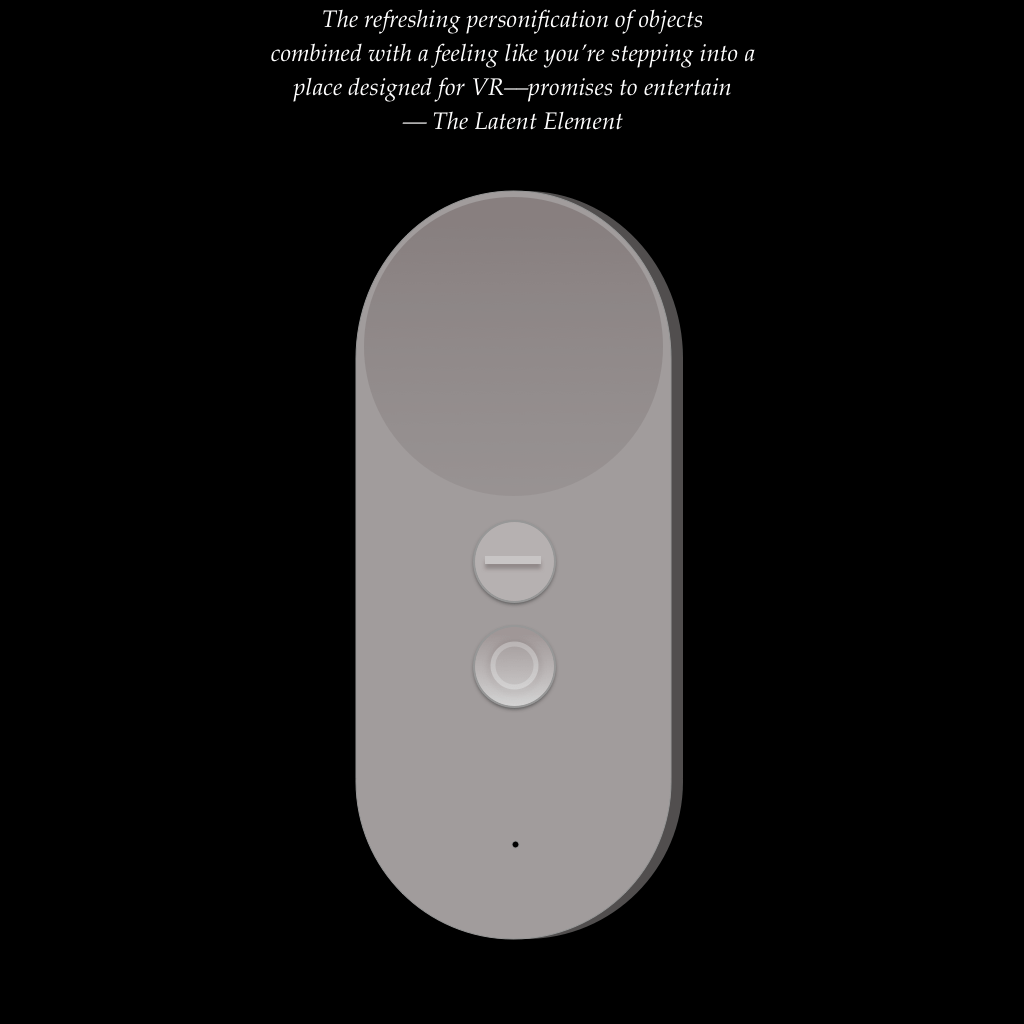
daydream-controller-1-the-latent-element.png# Virtual Virtual Reality

Created by the Ingenious Minds of Tender Claws

In Virtual Virtual Reality the setting is Activitude, where you play the role of a human trying to appease various “A.I.” characters. These characters end up being personified objects like a brick of butter, tumbleweed, or sailboat.

You will quickly be shown the button layout by the host, who calls you Bee. Your duties each take place in separate “virtual labor access points” which are really virtual realities within virtual reality and to enter and exit you will put VR headsets to your face using the Daydream Controller. Ipso facto, you will peel these headsets off to exit different virtual realities. As you begin your duties––chores that seem unmanageable, even by the most dexterous Daydream users standards––you are subjected to funny, quirky characters’ demands.

Progress will reveal that the virtual realities are holographic projections absconding a larger scheme…

Perhaps what I liked most about it was its design.

For the first time in a long while, I was given a reminder that we can create completely surreal worlds for users. Later on, I was on a train in Shanghai and looking down the train as we moved through turns the train cars reminded me of the vertebrae of a spine or something…

IMG_20170313_121843.jpg

I thought it’s almost like being inside of a snake. This immediately became food for thought for a VR piece–climbing into a snake as a mode of transportation.


Virtual Virtual Reality is designed for longer sessions (you can spend nearly half an hour
in the app) affording you the ability to try many things and headsets on without exhausting all possibilities. It follows, of course, that the app and daydream are super comfortable, thoughtfully crafted so you don’t need to view behind you that much. Tender Claws also made fantastic use of the controller and defined a mechanic that harks back to
Portal.

Teleportation is great with the application button and uses vectors to illustrate a warping effect.

I’m left wanting to play more. The character voice-overs, spatial audio, and sense of humor are especially notable.

IMAX and StarVR Partner to Bring VR to the Public

In a corollary to IMAX 3D and big screen production, IMAX has partnered with Starbreeze AB’s StarVR the head-mounted display (HMD) with a 210˚ horizontal field of view (FoV) to bring out-of-home VR viewing locations to consumers.

A reminder of the joy the IMAX experience elicits from viewers

Central HMD players––Oculus Rift and HTC Vive––purposefully chose a 110˚ horizontal FoV design. This supplies nearly full stereoscopic FoV which is 120˚ horizontally. When thinking about a virtual reality display, the wider the FoV the more considerable the display requirement in terms of total pixels. StarVR’s staggering 2560×1440 pixels per eye jives well with IMAX’s track-record for large, premium cinematic screening. So you know, this is compared with Playstation VR’s 960×1080 pixels per eye, Oculus Rift’s 1080×1200 pixels per eye, and HTC Vive’s 1080×1200 per eye all across about 110 degrees.

Pushing wider FoV and maintaining competitive pixel per degree results in greater power consumption for a given perceived brightness. Which is why Starbreeze announced its partnership with Acer as well to help bring more sophistication to the display performance.

“We are devoting R&D resources across multiple aspects of the VR ecosystem for a coherent and high-quality experience, while just last month Acer announced powerful desktops and notebooks fully-ready for StarVR. Starbreeze and Acer share the same goal of delivering best-in-class VR applications, and we look forward to unlocking new VR possibilities together with this partnership. ” – Jason Chen, Acer Corporate President and CEO

One of the first IMAX + StarVR out-of-home locations will be in Los Angeles and it will be interesting to see how similar their layout will be to Kaleidoscope Festival which fills rows of chairs that support 360˚ turning with gawking-gear-vr viewers.

People explore some VR content in rows at a Kaleidoscope VR event Los Angeles

Starbreeze’s demo of Overkill’s The Walking Dead was one of the most sketchy virtual reality experiences I’ve had because they simulated a zombie apocalypse well enough to feel that way. I was sitting in a wheelchair wielding a pump shotgun which were mapped appropriately into the virtual construction. Being on a guided path helped with motion-sickness (constant velocity). 

StarVR_TheWalkingDead.jpg

Myself using The Walking Dead demo at VRLA earlier this year.

The Economist

The Economist participates in Virtual Reality content for the first time by collaborating with Rekrei, formerly known as Project Mosul.

Project Mosul, a VR service/production studio did a trial piece with The Economist followed by showcasing of that work at various conferences to create a buzz.

Rekrei collects artifacts from locals and uses photogrammetry to reconstruct establishments from previous eras.

Photogrammetry is a technique that uses multiple images of an object, taken from different angles, into a piece of software that combines them to form a three-dimensional model.

The Economist’s collaboration

It’s not novel and has limitations (i.e. time intensity can be high, and for larger spaces it may not be feasible), but it’s becoming a prominent tool for virtual asset creation of physical objects or locations because it may look pretty realistic. See also: realities.io inside of the HTC Vive for particularly appealing photogrammetry application.

Google VR Announcements

Among many things Google announced Google Daydream platform. Included was it’s HMD reference design for manufacturers that included a gamepad similar to the Oculus Rift remote. Some other talks revolved around VR design learnings, Daydream Labs prototyping, long-time resident Google film-maker Jessica Brillhart’s take on cinema in VR and Youtube, and Enhancing Applications and Websites with Embeddable VR. Find a number of those talks here: http://bit.ly/25935hX.

What sticks out to me from Google VR? Bringing our physical world and digital environments together.

I have a Project Tango developer kit and while it’s quite neat in some aspects it falls flat in other areas. The range of the sensors isn’t the best, even when the item you want to scan is less than half a meter from you the device won’t be able to successfully detect and scan it.

Project Tango

There will definitely be improvements over time, the project lead, Johnny Lee outlined the resources invested in the project. Namely, >10 research partner institutions, 26 conference/journal papers, 25 PhD and Masters students, and >50K lines of open source code.

However I think it’ll take time for it to take off, and the two most important parts for it to succeed are the ease of use and the quality of the device/scan. I chatted with the CEO of Jahan, a platform that leverages 3D scanning to allow you to visit the world’s museums and heritage sites with Virtual Reality. He said what was easily the biggest issue for him is the resolution of the camera, which at 4 MP leaves room for improvement and doesn’t pick up detail, which is important for 3D scanning and indoor mapping. In more personal experiments I have found battery life and slow charging capabilities to be obstacles to development and use. The holds on the back-sides of the tablet suit the hands nicely.

Switching gears, it’s great that Google has announced Daydream, a platform requiring phones with appropriate sensors, display, and system on a chip to handle motion to photon latency constraints, but at the same time I have questions surrounding the accessibility of the Google Daydream phones. Practicality of the mission to get VR into the hands of everyone calls for added value at the Cardboard platform level where people can be introduced to VR content in lighter weight formats like 360˚ video and pictures with a greater range of phones. I hope to understand more about the direction Cardboard is going.

Be on the lookout for more on topics discussed at Google I/O 2016.

Head of Sports and Strategic Video for Samsung Asia Paints his Vision for the Future

“If we think this is the VR tech from 15 years ago, we are wrong, it’s not the lawn mower men, it’s the mavericks.” – Head of Sports and Strategic Video Services at Samsung Asia, Maurizio Barbieri

Data on the Number of HMD Users Released, Underlining a Need for More VR Developers

Last week UploadVR wrote about the statistic that one million people used Gear VR last month. Recently, similar data on users of the HTC Vive has been rolled out based on Audioshield and Space Pirate Trainer installs. Though, it’s unclear how frequently these users are coming back to the HMDs, respectively. Seemingly both manufacturers share the perspective that providing such numbers may act as a catalyst to attract developers.

“Vive has approximately 45K users, increasing by 5K per week…if it does continue for at least several months, we could expect to have around 175,000 users on the Vive by start of the new year. This has to be seen as a very successful launch for a product priced so high.”